
The best free AI image generators in 2026 are genuinely capable — but "free" hides a lot of fine print: watermarks, low resolution, public-only galleries, and licences that forbid the commercial use most small business owners actually need. We picked four of the most talked-about free tools — Canva AI, Leonardo.Ai, Ideogram, and Google's Nano Banana 2 (built into Gemini) — fed them the identical prompt, and compared what came out. No sponsorships, no affiliate deals, just real results.
The prompt we used across all four: a warm, editorial-style illustration of a small home office with a laptop, a coffee cup, and soft morning light through a window. Every result is from the free tier, unedited.
What to check before picking a free AI image generator
Before comparing the tools, here are the five questions that separate a genuinely useful free tier from a frustrating one:
- Commercial use rights — can you actually use the image to sell something, or only for personal projects?
- Watermarks — does the free version stamp a logo across your image?
- Resolution — sharp enough for print, or only for small social thumbnails?
- Daily generation limits — how many images can you actually make before being asked to pay?
- Privacy of generations — are your images public by default, which matters if you are working on something unreleased?
The test: same prompt, four tools, real results

Canva AI

Leonardo.Ai

Ideogram
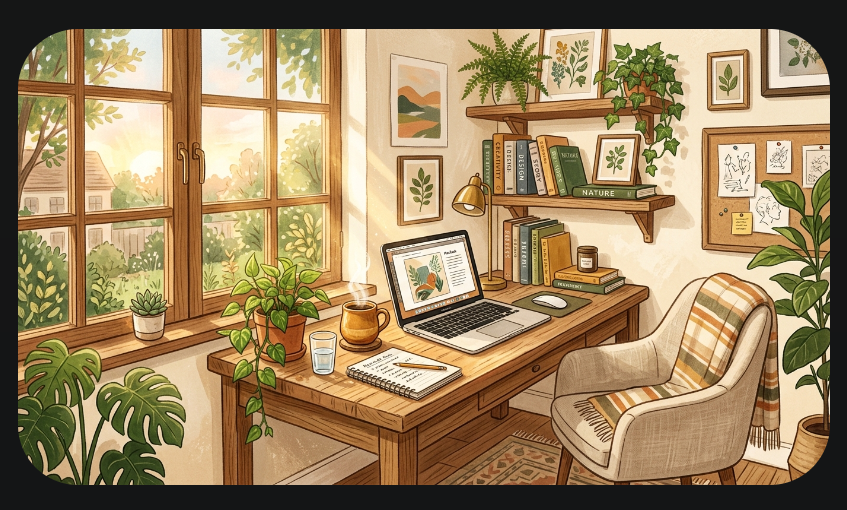
Nano Banana 2 (Gemini)
Canva AI Best for beginners
If you already use Canva for social posts or presentations, its built-in AI image generator is the path of least resistance. You generate an image and you are already inside the editor to drop it straight into a finished design. The free tier includes a daily generation limit and a visible watermark on certain export sizes, but for quick social graphics and blog headers, it is hard to beat for convenience.
The image quality on our test prompt was pleasant but not technically impressive compared to Leonardo or Ideogram — accurate subject matter, slightly flat lighting. For a blogger who wants a finished post header in two minutes without learning a new tool, this is enough.
Best for: small business owners and creators who want a finished graphic, not just a raw image file.
Commercial use: allowed on Canva Pro; restricted on the free tier for some uses. Check Canva's licence terms for your specific case.
Leonardo.Ai Best commercial free tier
Leonardo.Ai stood out for one reason most people care about most: commercial use is allowed on the free plan, which is rarer than it should be. The free tier gives approximately 150 tokens daily — enough for 30–70 images depending on settings — and the output quality on our test held up well: accurate lighting, coherent composition, no obvious AI artefacts in the hands or background.
The one caveat: free-tier images are public by default, so anything sensitive or pre-launch should not go through the free plan. If you need private generations, that requires an upgrade.
Best for: anyone who needs commercially usable images regularly without paying a subscription.
Daily limit: ~150 tokens (30–70 images). Images are public by default on the free tier.
Ideogram Best for text in images
Most AI image generators fail the moment you ask for text inside an image — letters warp, words misspell, logos turn into nonsense. Ideogram was built specifically to solve this. In our test it was the only tool that rendered a small "Open" sign in the background window cleanly and legibly on the first attempt, without any prompt engineering tricks.
A "Magic Prompt" feature automatically expands short prompts into more detailed descriptions, which helped produce a more polished result with less effort. If you are making YouTube thumbnails, event posters, or anything where text needs to actually read correctly, Ideogram is the specialist tool the others cannot match.
Best for: posters, thumbnails, and any image where text, a logo, or a readable sign needs to appear inside it.
Nano Banana 2 (Gemini) — best for Google Workspace users
If you are already inside Gemini for writing or research tasks, Google's Nano Banana 2 model generates images natively without switching apps. It is not the most stylistically distinctive of the four — our result tended toward a slightly generic, stock-photo look compared to Leonardo's or Ideogram's output — but the convenience of staying in one tool, plus tight integration with Google Docs and Slides, makes it a sensible default for anyone already living in the Google ecosystem.
Best for: people who want one tool for writing and images without adding another app or tab.
Free tier limits at a glance
- Canva AI: Limited daily generations, watermark on some export sizes, included with existing Canva free account.
- Leonardo.Ai: ~150 tokens daily (roughly 30–70 images), commercial use allowed, images public by default.
- Ideogram: Limited free daily credits, strongest at in-image text rendering, Magic Prompt included free.
- Nano Banana 2 (Gemini): Included with a free Google account, usage tied to Gemini's broader daily limits.
If you want to compare the paid AI image tools — Midjourney V8.1, GPT Image 1.5, and Leonardo's paid plans — we have a separate guide covering which paid AI image tool is worth the subscription in 2026.
The honest bottom line
- Choose Canva AI if: you want a finished, ready-to-post graphic with minimal extra steps and you already use Canva.
- Choose Leonardo.Ai if: you need commercially usable images regularly and do not want to pay for a subscription.
- Choose Ideogram if: your image needs readable text, a logo, or a sign inside it.
- Choose Nano Banana 2 if: you are already working inside Gemini and want to stay in one tool.
None of these free tiers will fully replace a hired designer for serious brand work. But for blog headers, social posts, and everyday content creation, any one of these four will quietly do the job better than stock photos did a few years ago — and for exactly the price you are paying right now: nothing.
Frequently asked questions
Which free AI image generator allows commercial use?
Leonardo.Ai allows commercial use on its free tier. It is the clearest choice for small business owners who need commercially usable images without a subscription. Always verify the current terms before using any AI-generated image commercially, as platform policies can change.
Which free AI image generator has no watermark?
Leonardo.Ai and Ideogram both provide watermark-free images on their free tiers. Canva AI adds a watermark on some export sizes on the free plan, which can be removed by upgrading to Canva Pro.
Can free AI image generators match paid tools like Midjourney?
For everyday social content and blog graphics, yes. For the highest aesthetic quality and precise prompt control — especially photorealistic or fine-art output — paid tools like Midjourney V8.1 still have a noticeable edge. Our paid AI image tool comparison covers that in full.