Best Home Office Setup Under $300 in 2026: The Right Buying Order

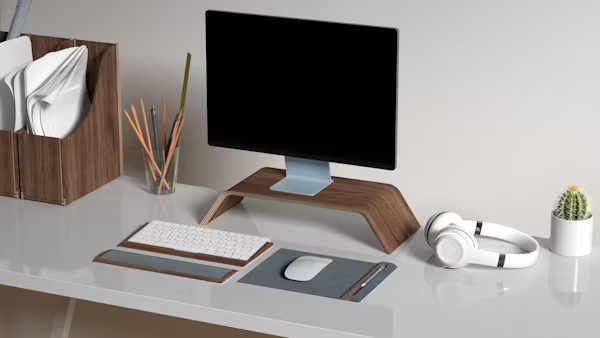
⚡ The $300 stack (buy in this order)
- Ergonomic chair — ~$145 (most important)
- Basic desk — ~$75
- Clip-on monitor light — ~$40
- Cable management clips — ~$13
- Budget headset — ~$27
Most home office setup guides buy in the wrong order — a nice keyboard first, a premium webcam second, and the things that actually affect an 8-hour workday last, if at all. Build it in the right order and a genuinely professional home office setup under $300 is completely achievable in 2026. Here's the exact order and the honest reason each item earns its spot.
Why the buying order matters more than the budget
The instinct is to fix what you can see first — the cable mess, the cluttered surface, the bare desk. That's backwards. Buying out of order means redoing earlier purchases once the next upgrade arrives, and most people end up overspending on the wrong things. The order below is sorted by impact-per-dollar on an actual 8-hour remote workday.
1. Ergonomic chair (~$145) — the foundation, not an upgrade
This is the single purchase that affects every single workday. Look for adjustable lumbar support that moves up and down (fixed lumbar pads rarely hit the right spot), breathable mesh, and height-adjustable armrests at minimum. Budget picks like the SIHOO M18 (~$147) consistently outperform their price on lumbar adjustability and build quality — it's the most recommended sub-$150 ergonomic chair across remote work communities in 2026. Spend here before anywhere else.
2. A desk that fits your actual room (~$75)
You don't need anything elaborate — a sturdy minimalist desk with enough surface for a laptop, notes, and a monitor is the entire requirement. Basic but solid options run roughly $70–90 on Amazon and IKEA. A stable surface matters more for long-term durability than any visual feature. If you already have a table that works, skip this entirely and reallocate the budget.
3. Lighting (~$40) — cheap and more impactful than people expect
Good lighting reduces eye strain and noticeably improves how you look on video calls — without needing an expensive webcam upgrade. A clip-on monitor light (no external power supply needed) runs around $40. If budget is tight, a basic adjustable gooseneck desk lamp covers the same need for roughly $20–25. Sort lighting before you worry about camera quality — it has a bigger impact on how you look than the camera itself.
4. A laptop stand, if you use a laptop (~$35)
Getting your screen to eye level eliminates most of the neck strain that accumulates from looking down all day. A vertical stand (turns your laptop into a desktop, frees desk space) runs about $35–40; an angled stand that keeps the laptop screen usable as a second display is a similar price. If you already use an external monitor, skip this.
5. Cable management (~$13) — the cheapest visible upgrade
Basic cable clips handle individual cords cleanly for under $15. An under-desk cable tray that hides everything runs around $40–45 if you want the complete solution. This is the upgrade that makes the biggest visible difference for the least money — it transforms a messy desk into one that looks intentional without touching anything else.
6. Basic audio (~$27) — prioritise this earlier than you'd think
Bad audio affects how you're perceived on every single call. Most people leave it until last, which is the wrong call — being heard clearly is more professionally important than anything you'd do to the visual setup. A decent budget headset in the $25–35 range (Logitech H390, Mpow HC6) solves the actual problem without blowing the rest of the budget. Sort audio before upgrading the webcam.
The real $300 breakdown
| Item | Approx. price | Priority |
|---|---|---|
| Ergonomic chair (SIHOO M18) | $145 | 🔴 Buy first |
| Basic desk | $75 | 🔴 Buy second |
| Clip-on monitor light | $40 | 🟡 Buy third |
| Cable management clips | $13 | 🟡 Buy fourth |
| Budget headset | $27 | 🟡 Buy fifth |
| Total | ~$300 |
Prices vary by retailer and change over time — treat this as a realistic shape for the budget, not an exact invoice.
Two things worth buying later, not now
- A premium keyboard and mouse. Comfortable peripherals matter, but they're not the foundation. Every item above makes a bigger daily difference than a mechanical keyboard at this budget stage.
- A premium webcam. If your setup has bad audio, a better camera won't fix how a call feels. Sort audio and lighting first — both have more impact on perceived video quality than the camera resolution.
Once your home office is set up, if you're actively freelancing or job hunting, our guide to landing your first Upwork client picks up from here — and covers the workspace and communication setup clients actually notice.
The honest bottom line
A genuinely professional home office setup under $300 doesn't require a four-figure budget — it requires buying the right things in the right order. Get the chair, desk, lighting, cable management, and basic audio sorted first. Everything after that is a preference upgrade, not a requirement.
Frequently asked questions
What do you actually need for a home office under $300?
The five essentials in order: ergonomic chair (~$145), basic desk (~$75), clip-on monitor light (~$40), cable clips (~$13), budget headset (~$27). Total: ~$300. Buy in this order, not by what looks most broken visually.
What is the best budget ergonomic chair?
The SIHOO M18 (~$147) consistently outperforms its price in the sub-$150 category — adjustable lumbar support, breathable mesh, and height-adjustable armrests. It's the most recommended budget ergonomic chair across remote work communities in 2026.
Should I buy a webcam or fix my audio first?
Fix audio first, every time. Bad audio makes calls feel unprofessional regardless of camera quality. A $27–35 headset has more impact on perceived call quality than a $100 webcam upgrade. Add the webcam after audio and lighting are sorted.
Driftnote Editorial Team
We researched and built a version of this setup firsthand, cross-referencing Reddit's r/WorkFromHome communities and remote work product reviews to validate the buying order and price estimates.